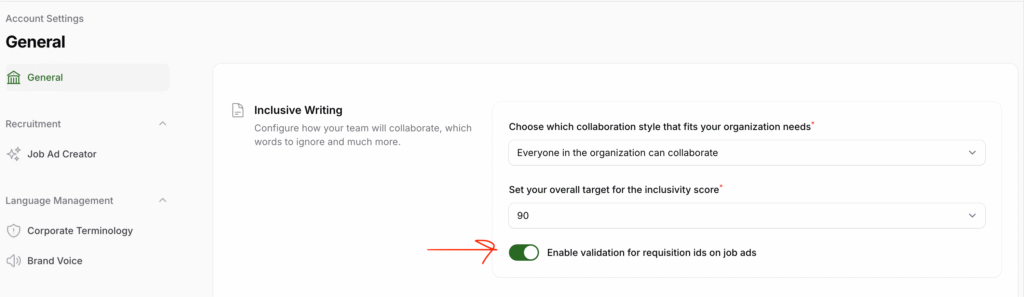
To help ensure that every user fills in the Requisition ID field for job ads on the Develop Diverse platform, you can enable a validation feature. This will display a warning if the Requisition ID field is left empty. Note that enabling this feature does not make the field mandatory.
How to Enable Requisition ID Validation
For Admins:
- Access Account Settings:
- Click on your avatar in the top-right corner of the platform.
- Select Account Settings.
- Navigate to General Settings:
- In the left-hand menu, click on General.
- Enable Requisition ID Validation:
- Under the first section, Inclusive Writing, locate the toggle labeled Enable validation for Requisition IDs on job ads.
- Switch the toggle to enable validation.
- Save Your Changes:
- Scroll to the bottom of the page and click Save.
With this feature enabled, users will receive a warning if the Requisition ID field is empty when creating or editing job ads.