
Each bias now comes with up to 3 high-quality, context-accurate alternatives, providing only the best suggestions.
We’ve improved our alternatives by considering more context, so one-word replacements aren’t the best solution anymore. To keep things simple, we’ve said goodbye to the alternative word buttons. Now, we offer three high-quality phrase rewrites that remove bias while preserving the original meaning. If you need more options, you can easily generate additional rewrites to find the perfect fit!
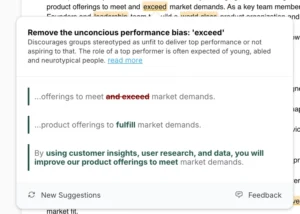
Replace your bias phrase easily by clicking on one of the alternatives. Need other options? Click on New Suggestions to see up to three new alternatives.
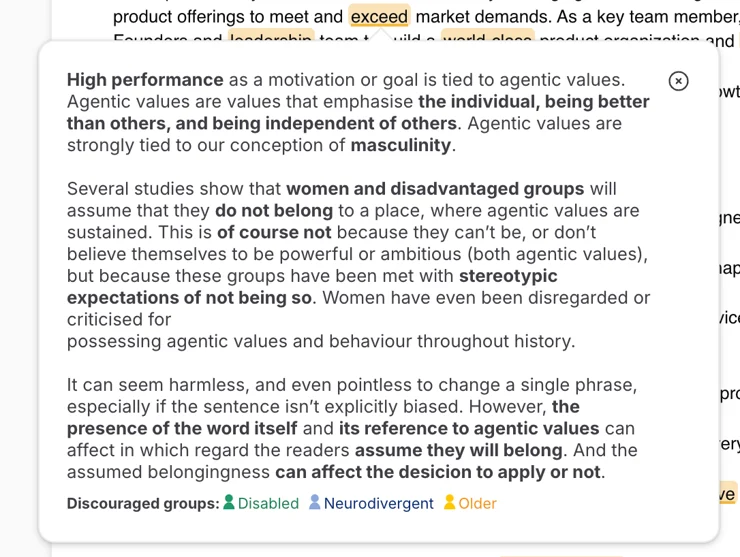
Click on read more to learn why the phrase is biased and discover which groups it excludes.
Let’s show you the new alternatives
Frequently Asked Questions
Where are the one-word suggestions?
The platform still provides single-word alternatives when analyzing individual words. You’ll see these when clicking on a highlight. However, these suggestions are now more contextually appropriate based on how the word is being used in the sentence.
Do I only get complete phrase suggestions?
You actually get both – individual word suggestions AND complete phrase rewrites when applicable. The most helpful suggestion is shown based on the context. Sometimes a single word change is sufficient, while other situations benefit from rephrasing a part of the sentence.
What part of the sentence is changed?
Only the dark green bold word or phrase is changed in comparison with the original sentence. This means when you see a suggestion, everything else in the sentence remains exactly the same – only the highlighted part (shown in dark green and bold) is different from your original text. This makes it easy to see exactly what would change if you accept the suggestion.
I used to get seven suggestions, now I only get three?
You’re correct that the number of displayed suggestions has been reduced to three. This was an intentional change to focus on quality over quantity. Instead of showing all possible alternatives, including potentially less relevant ones, we now displays the three most contextually appropriate suggestions. This helps prevent information overload and ensures the suggestions you see are the most useful and grammatically fitting for your specific context. If you need more options, you can always click “New suggestions” to see additional alternatives.