
Easily connect Greenhouse with Develop Diverse to create, edit, and sync inclusive job ads automatically. Follow these quick steps to get started!
Create new API Key
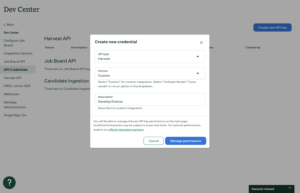
Go to Settings, then click on Dev Center in the left navigation. Click API Credentials in the left navigation.
- API type: Harvest
- Partner: Custom
- Description: Develop Diverse
- Click on Manage permissions
- Copy the API Key and store it in a safe place.
- Next step is to manage permissions
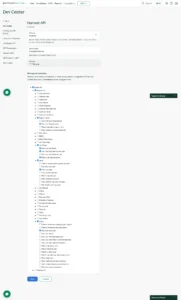
Select the following fields to ensure that we can sync your jobs and job posts from Greenhouse to Develop Diverse, while also allowing us to sync your inclusive job ads back to Greenhouse:
- Harvest 1
- Departments
- Get: List Departments
- Job Posts
- Get: List Job Posts
- Get: Retrieve Job Post for Job
- Patch: Update job posts
- Jobs
- Get: List Jobs
- Users
- Get: Retrieve User
- Departments
Click Save.
How to set it up in Develop Diverse
- Go to Account Settings
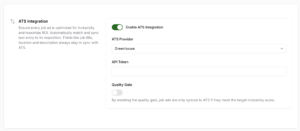
As an admin, click on your avatar and select Account Settings. - Enable ATS Integration
Under the Integrations section, find ATS. Turn on the toggle to enable ATS integration. - Choose Greenhouse
Select Greenhouse as your ATS provider and enter your Greenhouse API Token. - Set up the Quality Gate (Optional)
Want to ensure your job ads meet your inclusivity goals? Enable the Quality Gate so that only job ads hitting your target inclusivity score can be synced back to your ATS. - Save changes
Click Save, and you’re done! All your job details from Greenhouse will now sync to Develop Diverse, making it easier to draft and sync inclusive job ads.
Workflow
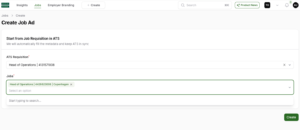
Find your job in Develop Diverse
Start by searching for the job requisition from your ATS in Develop Diverse. Select the job you want to work on. The job ad and all its metadata from ATS will automatically be synced to Develop Diverse. You can start analyzing and improving the inclusivity of your job ad right away!
You can not find your job?
- Make sure there is a job available. If there is a requisition without any jobs attached, the requisition is not available in Develop Diverse.
- Have you just created the job? We sync data from your ATS to Develop Diverse every hour. For example, if you have created a job 20 minutes ago, then it will take maximum 40 minutes to be available in Develop Diverse.
Managing Metadata
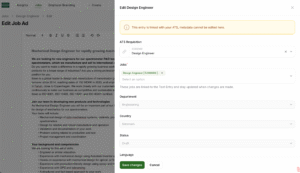
- Link or unlink jobs: Use the metadata section to link or unlink ATS requisition IDs or jobs.
- Update Metadata: To change other metadata fields, make the changes in ATS. These updates will sync automatically with Develop Diverse.
Syncing Back to your ATS
Once your job ad is inclusive and ready to go, it will automatically sync back to your ATS.
- If the Quality Gate is enabled, syncing will only happen once the job ad meets your inclusivity target.