
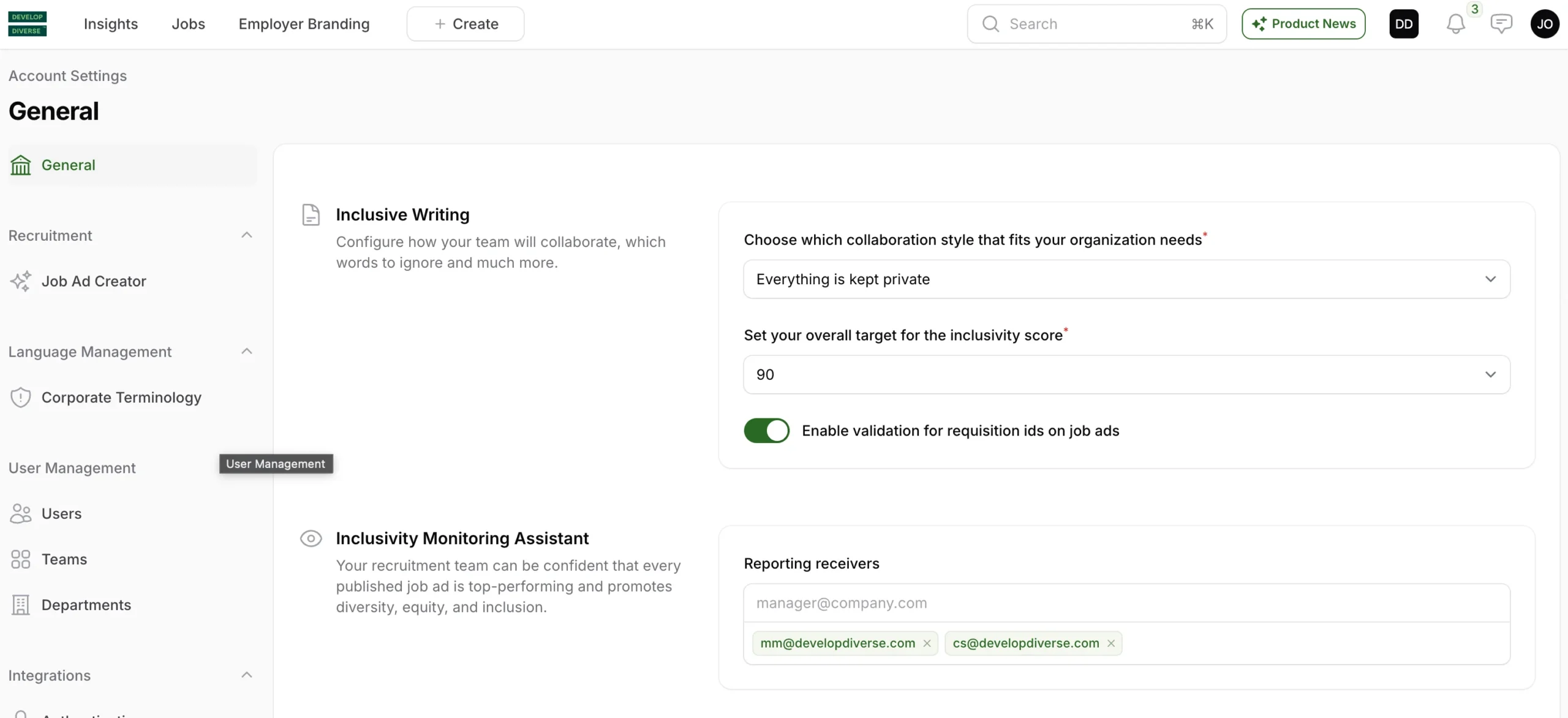
As an Admin, set your company target for your company by going to the account setting via clicking on your avatar at the right upper corner. In the paragraph Inclusive Writing, there is a heading Set your company target for the inclusivity score.
Our advice is to set the target on 90, as a job ad with an inclusivity score 90 does not exclude any group increasing the attractiveness of your job ad for a bigger group.
This goal impact when you are informed when a job ad does not reaches your inclusivity target and makes you easily monitor how you are performing against this target.
As an admin, you can tailor your company’s inclusivity target effortlessly with these simple steps. Follow the instructions below:
1. Access Account Settings
Click on your avatar in the right upper corner to access “account settings”.
2. Navigate to Inclusive Writing
Within the account settings, find the Inclusive Writing section. Look for the heading “Set your overall target for the inclusivity score.”
3. Set Inclusivity Target
Available options are 80, 85 and 90. We recommend setting the target at 90, as a job ad with an inclusivity score of 90 as this score is considered neutral, making your job ad more appealing to a broader audience.
Impact of Setting the Target
By setting the inclusivity target, you’ll be notified when a job ad falls short of your target. This feature allows you to easily monitor your performance against the inclusivity goal in your dashboard.